My Home Lab
A tour of my Kubernetes-based homelab running on Talos Linux with GitOps, self-hosted services, and full observability.
A homelab isn't just servers in a closet. It's a playground for learning, a quiet production environment for the stuff I actually use, and a way to keep my own data on my own machines. Here's the full tour.
For details on the physical machines, check out Homelab Hardware.
The hardware
My cluster runs on compact, power-efficient mini PCs:
| Node | Role | CPU | RAM | Purpose |
|---|---|---|---|---|
| intel-c-firewall | Control Plane | 4 cores | 8 GB | Kubernetes API, etcd (no workloads) |
| amd-w-minipc | Worker | 16 cores | 13 GB | Primary workloads |
| intel-w-acemagic | Worker | 4 cores | 16 GB | Storage-heavy workloads |
The intel-c-firewall node runs as a VM on Proxmox, hosted on a Glovary mini PC that also runs an OPNsense VM (firewall) and Pi-hole DNS. The other two nodes (amd-w-minipc and intel-w-acemagic) are bare metal mini PCs.
Total resources: 24 CPU cores, ~35 GB RAM, ~2.1 TB storage
All nodes hang off an unmanaged switch. No VLANs, no fancy segmentation, just flat networking that works.
Idles at 50W total. The electricity bill barely notices.
The operating system: Talos Linux
Instead of a traditional Linux distribution, I run Talos Linux, an immutable, API-managed OS designed for Kubernetes.
Immutable, by design. No SSH, no shell. The entire OS is read-only and managed via API — minimal attack surface, only essential components. Configuration is defined in YAML and applied via talosctl. Upgrades roll out automatically without downtime.
That sounds annoying until you live with it. Then it's calm. Nothing to forget to patch, nothing to half-configure.
Current versions:
- Talos: v1.11.5
- Kubernetes: v1.34.1
- containerd: v2.1.5
GitOps with Flux
Everything in my cluster is managed through Git. I use Flux v2 for GitOps, which means:
- All manifests live in a Git repository
- Flux watches the repo and automatically applies changes
- Secrets are encrypted with SOPS + age, with some stored in 1Password
GitOps repository for my Kubernetes homelab - Talos Linux, Flux, and all the YAML
cluster/
├── apps/           # Application deployments
├── networking/     # Ingress, DNS, load balancing
├── storage/        # Longhorn configuration
├── cert-manager/   # TLS certificates
├── monitoring/     # Prometheus stack
└── flux-system/    # Flux controllers
When I want to deploy something new, I commit YAML to the repo and push. Flux handles the rest.
Networking
Load balancing: MetalLB
Since this is bare metal (no cloud load balancers), I use MetalLB in Layer 2 mode to assign external IPs to services:
- IP Pool:
10.0.0.53-10.0.0.60 - Ingress Controller:
10.0.0.54 - Pi-hole DNS:
10.0.0.55
Ingress: nginx
All HTTP traffic flows through ingress-nginx running as a DaemonSet. Every service gets:
- HTTPS with auto-provisioned Let's Encrypt certificates
- A subdomain under
*.eduuh.com - Proper headers and timeouts for large file uploads
DNS: Pi-hole and CoreDNS
I run a split DNS setup:
Client → Pi-hole (10.0.0.55) → CoreDNS (10.0.0.53) for *.eduuh.com
                             → Cloudflare (1.1.1.1) for public domains
Pi-hole blocks ads and tracking at the DNS level, while CoreDNS resolves internal services.
Storage: Longhorn
My rule for the homelab is simple: I care about getting data back, not about staying up. Services can fall over. Data can't disappear. Longhorn fits that — distributed block storage across the cluster, with 2-3 replicas of each volume spread over nodes, automated snapshots, and both ReadWriteOnce and ReadWriteMany modes.
If a node dies, the data is still available on the others. Off-cluster backups are next on my list. I haven't spent enough time with Longhorn's recurring backup jobs yet.
What I self-host
Media stack
The usual suspects for a media setup:
| Service | Role |
|---|---|
| Jellyfin | Streaming (open-source Plex alternative) |
| qBittorrent | Torrent client with web UI |
| Sonarr | TV show automation |
| Radarr | Movie automation |
| Prowlarr | Indexer management |
All services share a 200GB volume with organized directories:
/media/
├── downloads/
├── tv/
└── movies/
This enables hardlinks. When Sonarr moves a completed download, it's instant — no extra disk space used.
Productivity
| Service | Role |
|---|---|
| Immich | Self-hosted Google Photos replacement (100GB library) |
| Nextcloud | File sync and collaboration |
| Vaultwarden | Bitwarden-compatible password manager |
| n8n | Workflow automation |
| Memos | Lightweight note-taking |
Utilities
| Service | Role |
|---|---|
| Glance | Dashboard with service monitoring |
| IT-Tools | Developer utilities collection |
| Uptime Kuma | Status monitoring |
The dashboard
Glance ties everything together:
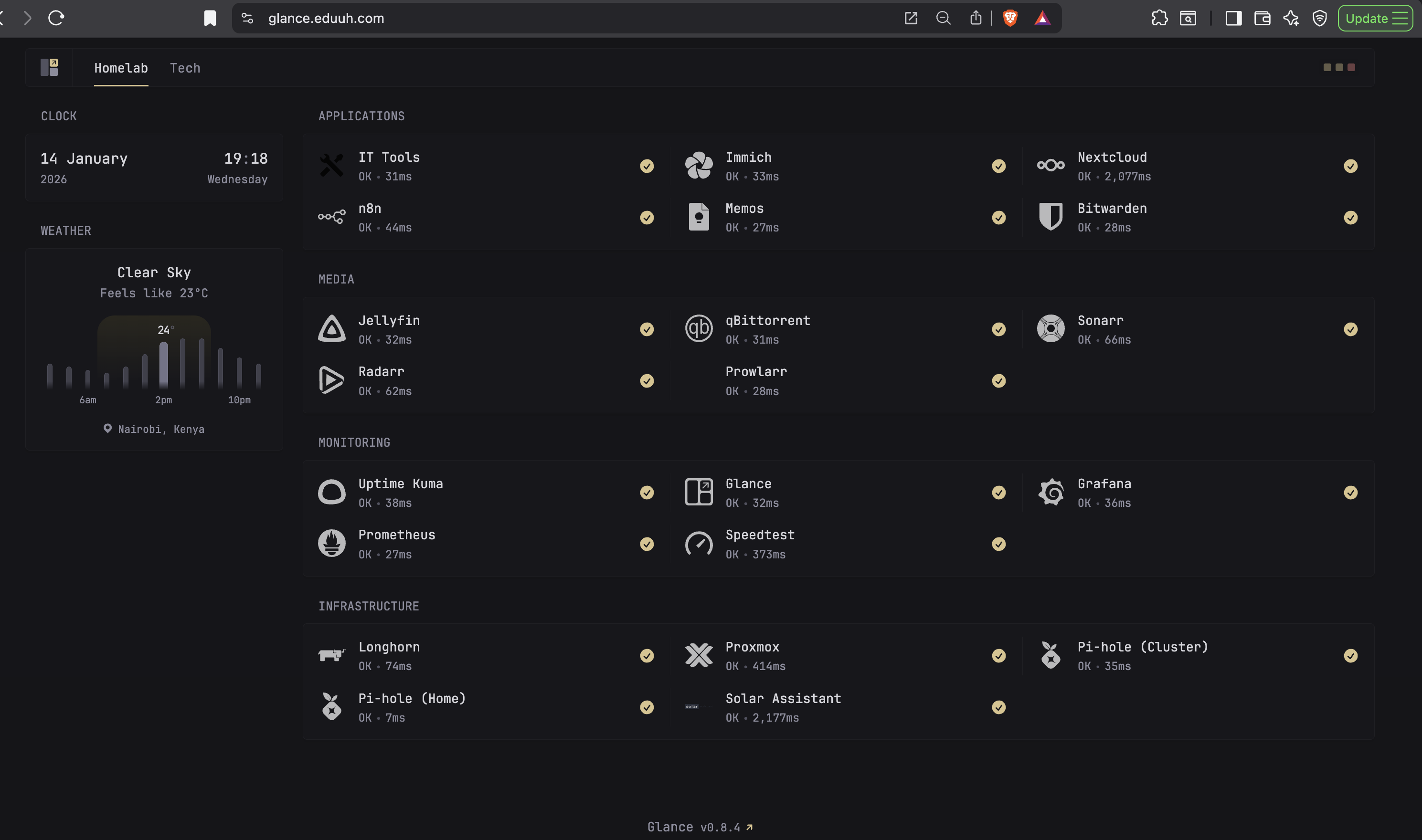
Service health, response times, grouped into Applications, Media, Monitoring, and Infrastructure. It's the first thing I check when something feels off.
Observability
Prometheus and Grafana
The kube-prometheus-stack provides:
- Prometheus for metrics collection (30-day retention)
- Grafana for visualization
- AlertManager for notifications
- Pre-configured dashboards for Kubernetes metrics
Custom exporters
The OPNsense exporter pulls metrics from the firewall: CPU, memory, interface traffic, WAN latency. Speedtest Tracker runs hourly internet checks and keeps the history.
Custom Grafana dashboards on top: internet bandwidth usage, up- and down-speeds over time, per-interface traffic on the firewall.
The service map
| Service | URL | Purpose |
|---|---|---|
| Jellyfin | jellyfin.eduuh.com | Media streaming |
| qBittorrent | qbittorrent.eduuh.com | Downloads |
| Sonarr | sonarr.eduuh.com | TV automation |
| Radarr | radarr.eduuh.com | Movie automation |
| Prowlarr | prowlarr.eduuh.com | Indexers |
| Immich | images.eduuh.com | Photos |
| Nextcloud | nextcloud.eduuh.com | Files |
| Vaultwarden | bitwarden.eduuh.com | Passwords |
| n8n | n8n.eduuh.com | Automation |
| Memos | memos.eduuh.com | Notes |
| Glance | glance.eduuh.com | Dashboard |
| Grafana | grafana.eduuh.com | Metrics |
| Pi-hole | pihole.eduuh.com | DNS admin |
| Longhorn | longhorn.eduuh.com | Storage UI |
Lessons learned
The single principle that shaped everything else: data-recovery over reliability. It's just me and my wife using these services. If something goes down, nobody pages me. What matters is that data can be recovered. That mindset makes every other infrastructure decision easier.
Start simple, then iterate. My first attempt was over-engineered with Ansible, Terraform, and multiple VMs. The current Talos-and-Flux setup is far simpler and more reliable.
GitOps is worth it. Everything in Git means I can rebuild the entire cluster from scratch, and when things break, git log shows exactly what changed.
Shared storage matters. The media stack only works smoothly because all services see the same filesystem — plan that upfront and skip a lot of pain later.
Monitoring from day one. Adding observability after the fact is painful. Bake it in.
Hardware roadmap
The current storage setup works, but there's room to grow. A dedicated NAS for large-scale storage and off-cluster backups is the next big move. I've also got two 4TB 2.5" SSDs sitting in a drawer for expanding cluster storage, plus a 1TB drive earmarked for OS-level operations.
For Jellyfin, an old Dell laptop with an 8th-gen Intel Core i7 would be ideal — plenty of compute for hardware transcoding. The plan is to swap it in for intel-w-acemagic, which has the lowest compute of the three nodes, and find a new role for the ACEMAGIC.
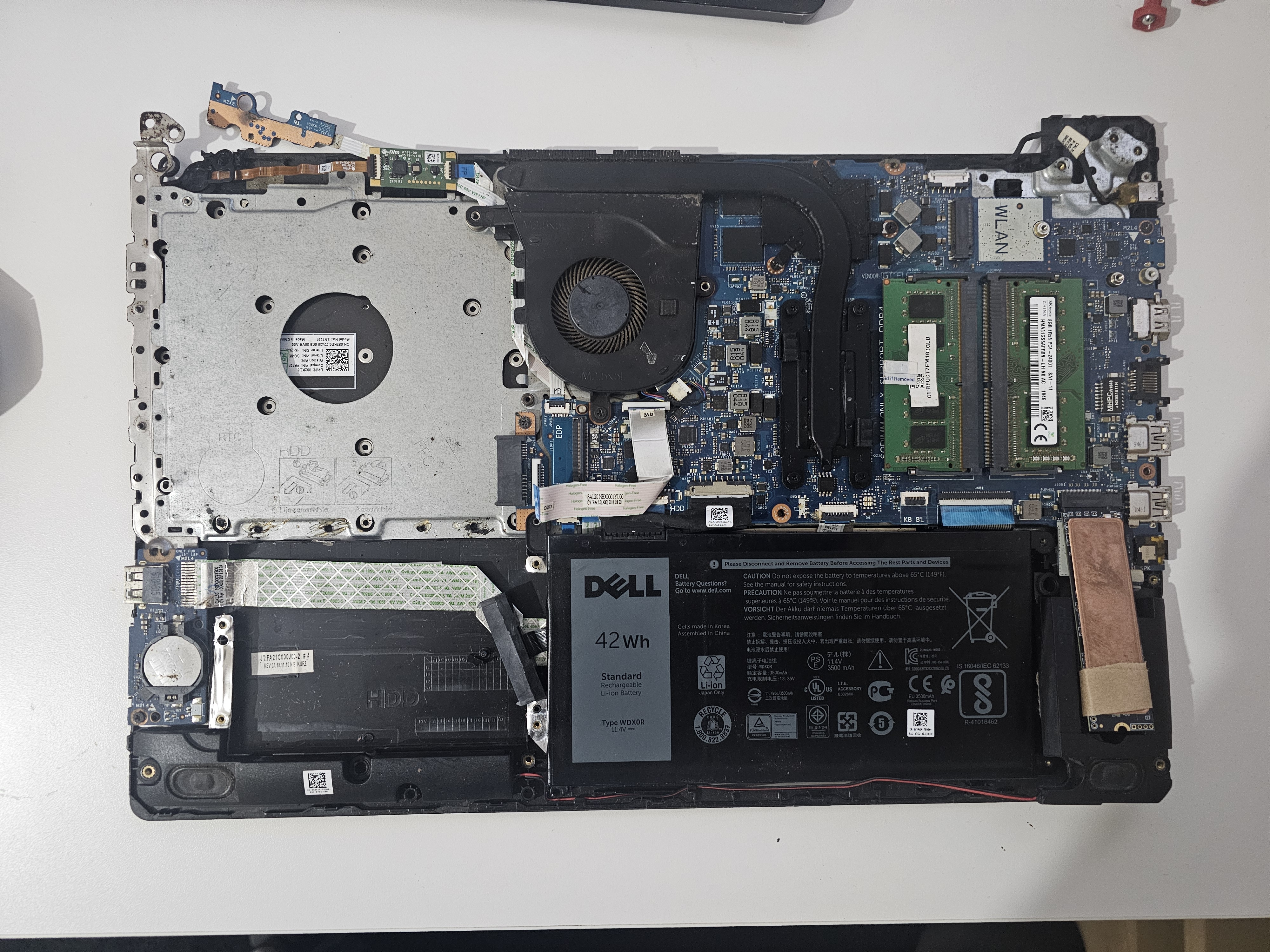
Splitting bulk media off the cluster would ease both performance and backups. More capacity also opens the door to self-hosting smart home camera feeds.
What's next
- Hardware transcoding for Jellyfin (Intel QuickSync)
- Automated backups to off-site storage
- Home Assistant for smart home integration
- More n8n workflows
The homelab is never "done". That's the fun of it.
Last updated on January 13th, 2026